|
|
Hello, Kinbay, And, please also let me know the exact device name you used for CTS Verifier. For example, if the USB microphone is needed, please let me know the model name(PILLAR CM-7010USB). Thank you. Sangmin Choi. |
|
|
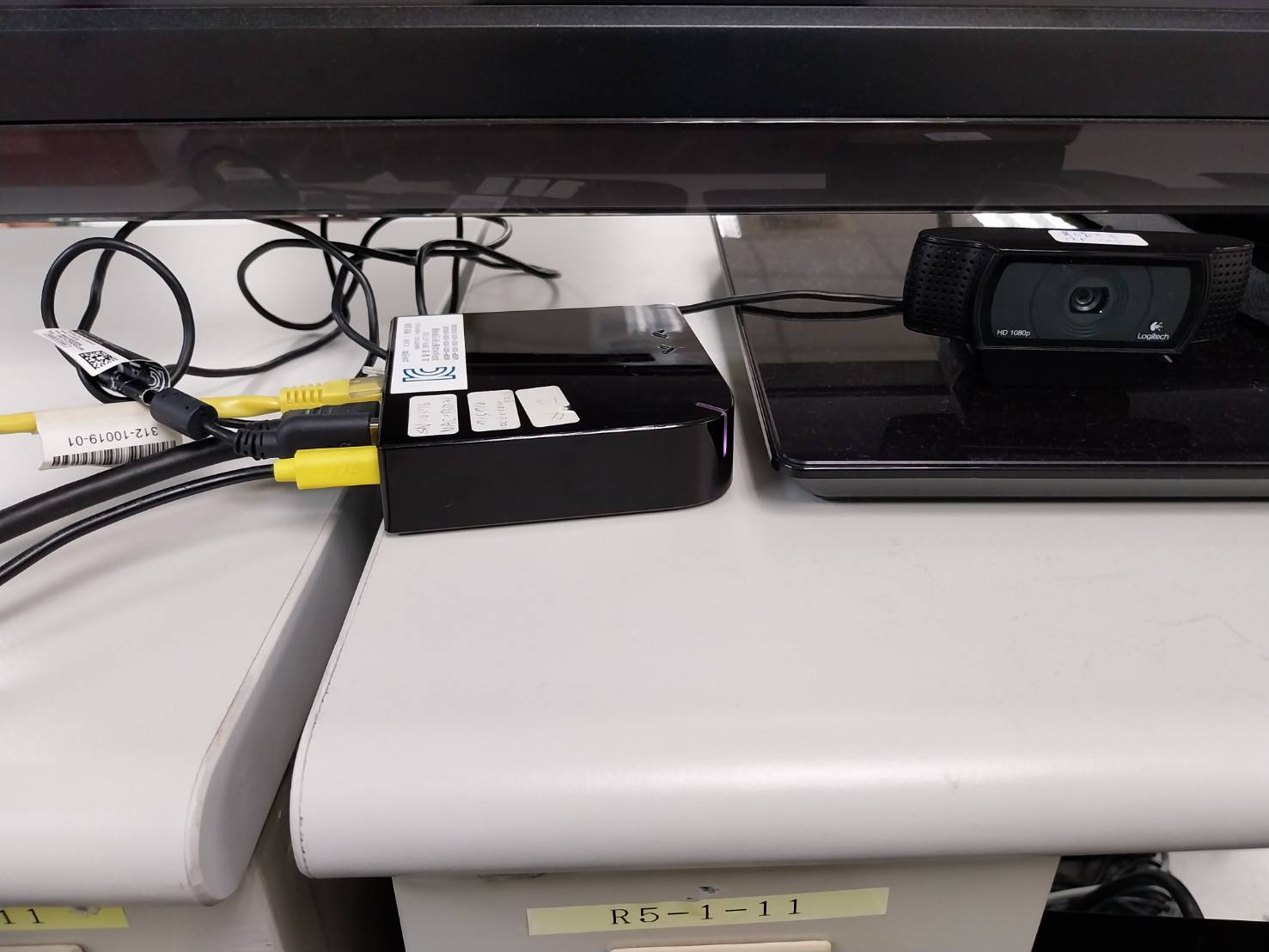
Hi Choi We did not perform testing for the test case, therefore we pressed pass directly. (as attached pic) About the exact devices We use the SONY KD-43X8000H device for displaying the screen. And use a Logitech camera like the attached pic. Thank you Kinbay |
|
|
Hello, Kinbay, Please provide detail guide for full test cases. Not only Audio, Camera but also all other cases. Audio and Camera are just an example. Thank you. Sangmin Choi. |
|
|
Hi Choi You can follow the guide website to try it. https://source.android.com/docs/compatibility/cts/cts-verifier Thank you Kinbay |
|
|
Hi Kinbay, Since this is our first time doing this because you have already conducted the test and passed it, we would like guidance on whether there are any precautions or things to check when testing. please kindly guide to Choi. Thanks, |
|
|
Hello, Kinbay, I'm testing CTS Verifier with the pages you shared and I will ask one by one if there is any question. Thank you. Sangmin Choi. |
|
|
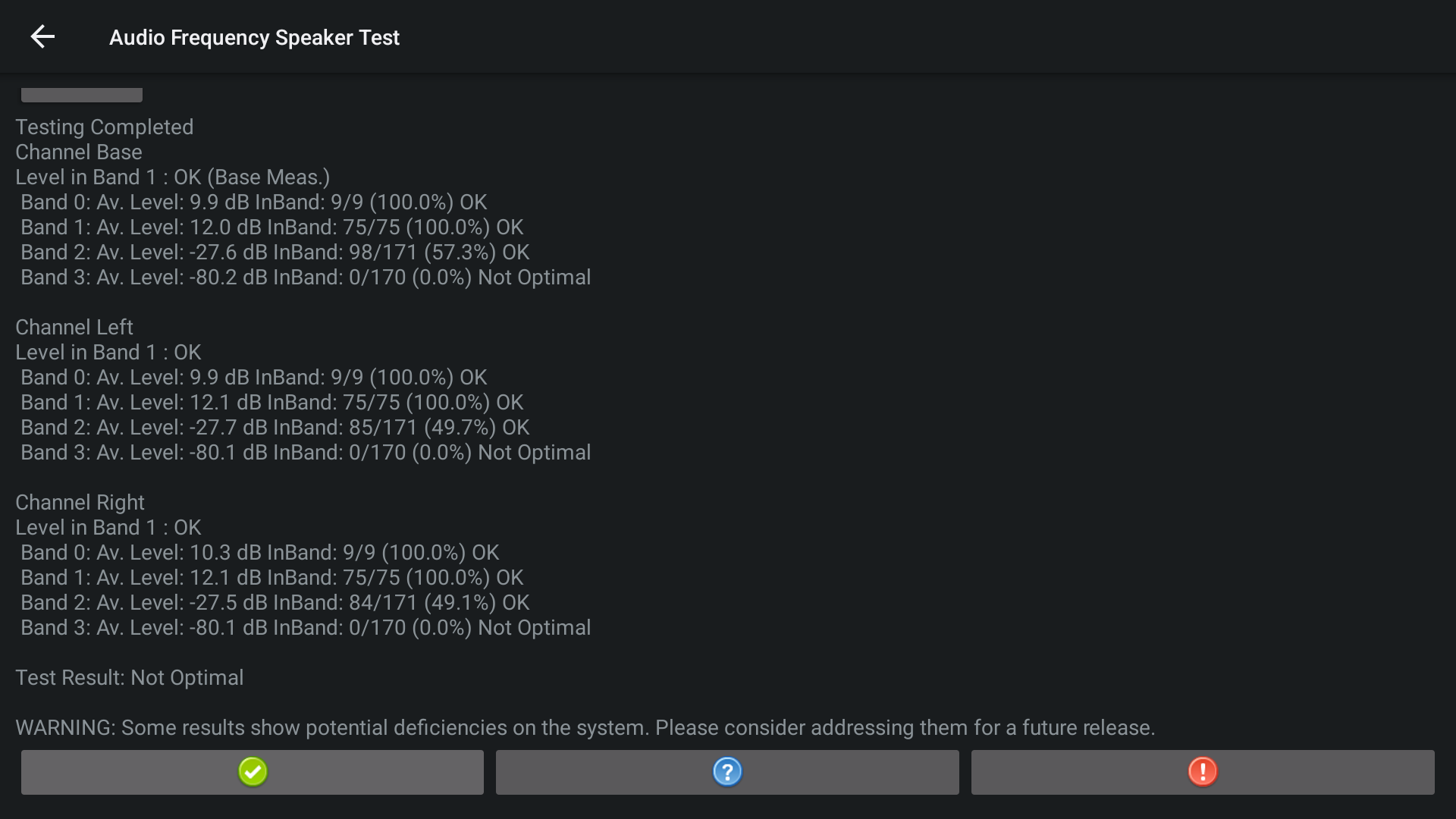
################################################ ## CLEAR ################################################ Hello, Kinbay, AUDIO -> Audio Frequency Speaker Test I connected the USB microphone and I got the following result. Test Result is no PASS, how can I get the pass result? Thank you. Sangmin Choi. Audio_Frequency_Speaker_Test.png (192,656 bytes) |
|
|
Hello, Kinbay, Please let me know how can I run the AUDIO -> Hifi Ultrasound Speaker Test ? I did several times, but I can't get the pass result. Thank you. Sangmin Choi. |
|
|
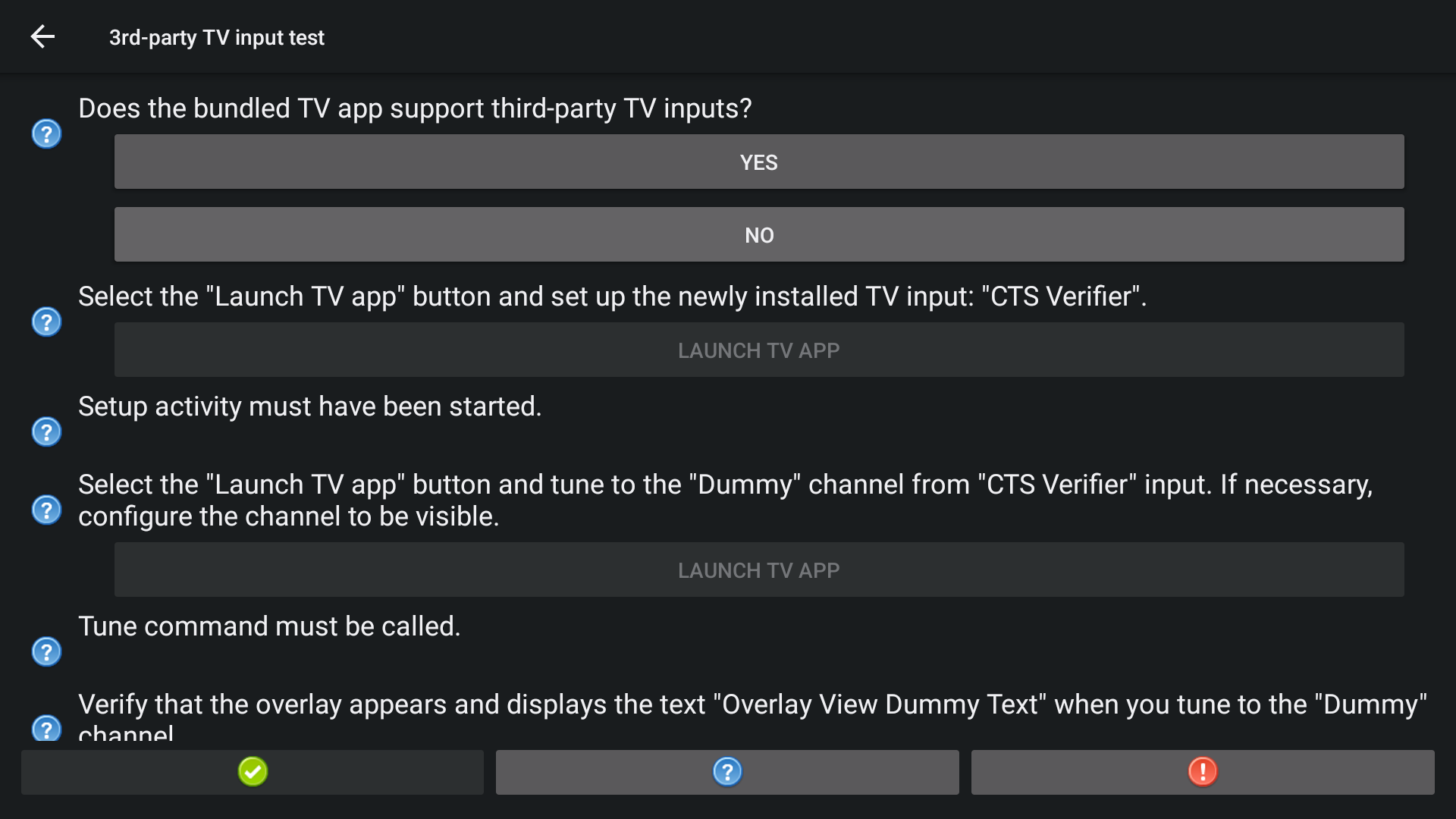
################################################ ## CLEAR ################################################ Hello, Kinbay, In TV section, I can see following question. Does the bundled TV App support third-party inputs? -> Which option should I select? YES or NO? Thank you. Sangmin Choi. 3rdparty_tv_input_test.png (178,323 bytes) |
|
|
Hi Choi For this session AUDIO -> Audio Frequency Speaker Test You can press 'pass' in the bottom left corner to finish the test. We often get the "No Optimal" result, too. Thank you Kinbay |
|
|
Hi Choi Does the bundled TV App support third-party inputs? -> Which option should I select? YES or NO? ==> Press "NO" Thank you Kinbay |
|
|
Hi Choi AUDIO -> Hifi Ultrasound Speaker Test >> Connect the camera for test >> Press "PLAY" will play the sound. >> Then you can press pass in the bottom left corner. Thank you Kinbay 5dbb87f3-33fa-4080-b884-69a4f3731465.mp4 (5,102,727 bytes) |
|
|
Hello, Kinbay, AUDIO -> Hifi Ultrasound Speaker Test >> Connect the camera for test >> Press "PLAY" will play the sound. >> Then you can press pass in the bottom left corner. Can you get the pass result on the record device? I always got the fail result on the record device. Thank you. Sangmin Choi. HifiUltrasoundSpeakerTest.mov (113,879,109 bytes) |
|
|
Hello, Kinbay, HARDWARE -> USB Device Test DUT : Developer options -> Enable USB device mode -> Disable Helper Device : Developer options -> Enable USB device mode -> Enable I installed CTS Verifier APK to DUT. And, I installed CTS Verifier USB Companion APK to Helper Device. Open CTS Verifier USB Companion from Helper Device and click "START DEVICE TEST COMPANION". Open CTS Verifier from DUT and click HARDWARE -> USB Device Test. If I connect the DUT and Helper Device using USB AA cable, the permission allow dialog was displayed on DUT. But, if I select OK for permission, the CTS Verifier application from DUT was crashed. 05-17 11:27:33.684 com.android.cts.verifier 8089 - E UsbManager exception in UsbManager.openDevice 05-17 11:27:33.684 com.android.cts.verifier 8089 - E UsbManager java.lang.IllegalArgumentException: device /dev/bus/usb/001/007 does not exist or is restricted 05-17 11:27:33.684 com.android.cts.verifier 8089 - E UsbManager at android.os.Parcel.createExceptionOrNull(Parcel.java:2430) 05-17 11:27:33.684 com.android.cts.verifier 8089 - E UsbManager at android.os.Parcel.createException(Parcel.java:2410) 05-17 11:27:33.684 com.android.cts.verifier 8089 - E UsbManager at android.os.Parcel.readException(Parcel.java:2393) 05-17 11:27:33.684 com.android.cts.verifier 8089 - E UsbManager at android.os.Parcel.readException(Parcel.java:2335) 05-17 11:27:33.684 com.android.cts.verifier 8089 - E UsbManager at android.hardware.usb.IUsbManager$Stub$Proxy.openDevice(IUsbManager.java:1022) Could you please let me know how can I pass this item? Thank you. Sangmin Choi. |
|
|
Hello, Kinbay, NETWORKING -> Bluetooth Test -> BLUETOOTH HID -> Bluetooth HID Device I clicked "REGISTER APP" and "MAKE DISCOVERABLE" on DUT, but there is no device on Helper Device. How can I proceed this test case? Thank you. Sangmin Choi. |
|
|
Hi Choi AUDIO -> Hifi Ultrasound Speaker Test Our test method involves one DUT connected to a Logitech camera. 1. Check that sound is played after the "PLAY" button is pressed. 2. If the button in the bottom left corner can be pressed to pass, it is determined to be successful. Thank you Kinbay 301711.jpg (102,670 bytes) cc32f2c5-b970-4018-9cc3-14761cc8ca58.mp4 (4,717,575 bytes) |
|
|
Hello, Kinbay, AUDIO -> Hifi Ultrasound Speaker Test Our test method involves one DUT connected to a Logitech camera. 1. Check that sound is played after the "PLAY" button is pressed. 2. If the button in the bottom left corner can be pressed to pass, it is determined to be successful. So, you can get the pass result on Helper device, right? Could you please share the screenshot of Helper device? Thank you. Sangmin Choi. |
|
|
Hi Choi NETWORKING -> Bluetooth Test -> BLUETOOTH HID -> Bluetooth HID Device This product does not support, direct to press pass. Thank you Kinbay |
|
|
Hello, Kinbay, NETWORKING -> Bluetooth Test -> BLUETOOTH HID -> Bluetooth HID Device This product does not support, direct to press pass. How about other test items? BLUETOOTH HID Bluetooth HID Device -> This product does not support, direct to press pass. Bluetooth HID Host -> DEVICE COMMUNICATION Insecure Client -> Insecure Server -> Secure Client -> Secure Server -> Thank you. Sangmin Choi. |
|
|
Hi Choi AUDIO -> Hifi Ultrasound Speaker Test So, you can get the pass result on Helper device, right? Could you please share the screenshot of Helper device? ==> No, We only use the one DUT to test it. (only connect to the camera device) And manual confirms by human hearing that the sound is heard. Thank you Kinbay |
|
|
Hello, Kinbay, AUDIO -> Hifi Ultrasound Speaker Test So, you prepared one device and connect the USB camera. And, press "PLAY" button and click PASS button, right? Does 3PL also test same procedure? Thank you. Sangmin Choi. |
|
|
Hello, Kinbay, Please check below comments in this ticket. https://btracker-cns.fii-foxconn.com/vaas/view.php?id=1945#c15828 https://btracker-cns.fii-foxconn.com/vaas/view.php?id=1945#c15838 https://btracker-cns.fii-foxconn.com/vaas/view.php?id=1945#c15843 Thank you. Sangmin Choi. |
|
|
Hi Choi HARDWARE -> USB Device Test Can I know what your helper device? Pixel? Thank you Kinbay |
|
|
Hello, Kinbay, HARDWARE -> USB Device Test Can I know what your helper device? Pixel? -> I tried using another Eagle device. If there is any guide to test it, please let me know. Thank you. Sangmin Choi. |
|
|
Hi Choi As I see on https://source.android.com/docs/compatibility/cts/cts-verifier?authuser=1#usb-accessory Official website suggests to use the Pixel for avoid flaky behavior Maybe you can try it on another Android phone? -------- Figure 3. Instructions for the voicemail broadcast test. Specific instructions to avoid flaky behavior: Install the CtsVerifier.apk on the DUT Install the CtsVerifierUSBCompanion.apk on the Pixel -------- Thank you Kinbay |
|
|
Hello, Kinbay, Thank you, USB Device Test has completed. Please check following comments. https://btracker-cns.fii-foxconn.com/vaas/view.php?id=1945#c15838 https://btracker-cns.fii-foxconn.com/vaas/view.php?id=1945#c15843 Thank you. Sangmin Choi. |
|
|
Hello, Kinbay, Please check following comments. https://btracker-cns.fii-foxconn.com/vaas/view.php?id=1945#c15838 https://btracker-cns.fii-foxconn.com/vaas/view.php?id=1945#c15843 Thank you. Sangmin Choi. |
|
|
Hi Choi AUDIO -> Hifi Ultrasound Speaker Test So, you prepared one device and connect the USB camera. And, press "PLAY" button and click PASS button, right? ==> Yes. Does 3PL also test same procedure? ==> Yes, I just double-confirmed with 3PL. Thank you Kinbay |
|
|
Hello, Kinbay, NETWORKING -> Network Background Connectivity Test I couldn't pass this item yet. There is an error message related with IPv6, could you please let me know your router setting? or, if you have any tips to pass it, please let me know. Thank you. Sangmin Choi. |
|
|
And, please check following comment also. https://btracker-cns.fii-foxconn.com/vaas/view.php?id=1945#c15838 Thank you. Sangmin Choi. |
|
|
Hi Choi NETWORKING -> Network Background Connectivity Test About this test, you can try to follow steps to test: 1. If already logged into the SKB account, please log out (factory reset). 2. Insert the USB WIFI Dongle and power on, then connect to the WIFI AP (IPv6). 3. Use WIFI ADB to connect to the box. 4. Set the property "persist.sys.skb.mode" to 1 (to bypass SKB Korea network checks). 5. Reboot once to apply the settings. 6. Install CTS-Verifier. 7. Execute the Network Background Connectivity Test item. 8. Press the START button. 9. Next, the test item requires the screen to be turned off, but since it is stuck on the SKB login page and the PowerKey on the RCU is locked, you can use the following method: 1) Using WIFI ADB, enter "adb shell" and input "input keyevent 223" to put the box to sleep. 2) Wait for 2 minutes. 3) Using WIFI ADB, enter "adb shell" and input "input keyevent 224" to wake the box up. Best regards Kinbay |
|
|
Hi Choi BLUETOOTH HID -> This product does not support, direct to press pass. Bluetooth HID Device Bluetooth HID Host DEVICE COMMUNICATION -> This part can be tested with another Eagle device by installing the cts-verifier tool. Insecure Client Insecure Server Secure Client Secure Server Best Regards Kinbay |
|
|
Hello, Kinbay, NETWORKING -> Bluetooth Test It's clear, thank you! Best Regards, Sangmin Choi. |
|
|
Hello, Kinbay, It's the last test case. NETWORKING -> Network Background Connectivity Test Does your network support IPv6? Our ISP doesn't support IPv6. Do you use any 3rd party service to pass this test such as VPN? Please help me to pass it on our side. Thank you. Sangmin Choi. |
|
|
Hello, Kinbay, I passed Network Background Connectivity Test. I close this ticket, thank you so much for your help. Best Regards, Sangmin Choi. |
- yk.jung ( (ALTech) Younkwang Jung ) developer

.png)
.png)
